
GMB Posting Software to schedule Google My Business posts
Write a post once, pick the date and time, and GBPNinja publishes it to your Google Business Profile, and to Facebook, Instagram and LinkedIn if you like. A Google Business Profile post scheduler that’s free to use.
- Updates, offers and events with buttons
- One post for many locations
- Calendar with drag-and-drop rescheduling
GMB post scheduler
Google post types
channels from one calendar
published at the time you pick
How to schedule posts on Google My Business
Google’s own Business Profile editor can’t hold a post for later. With GBPNinja, scheduling Google My Business posts takes three steps.
Connect your Google Business Profile
Sign up free and connect Google with its own secure sign-in. Pick the profiles you manage. Add Facebook, Instagram and LinkedIn if you want to post there too.
Write your Google post
Open the composer and write a What’s new update, an Offer or an Event. Add a photo and a button like Book, Call now or Learn more, and check the live preview.
Pick a date and time, then Schedule
Choose when it should go live and click Schedule. GBPNinja publishes it to every location you picked at that time, and it shows on your content calendar.
A Google My Business scheduler with a real calendar
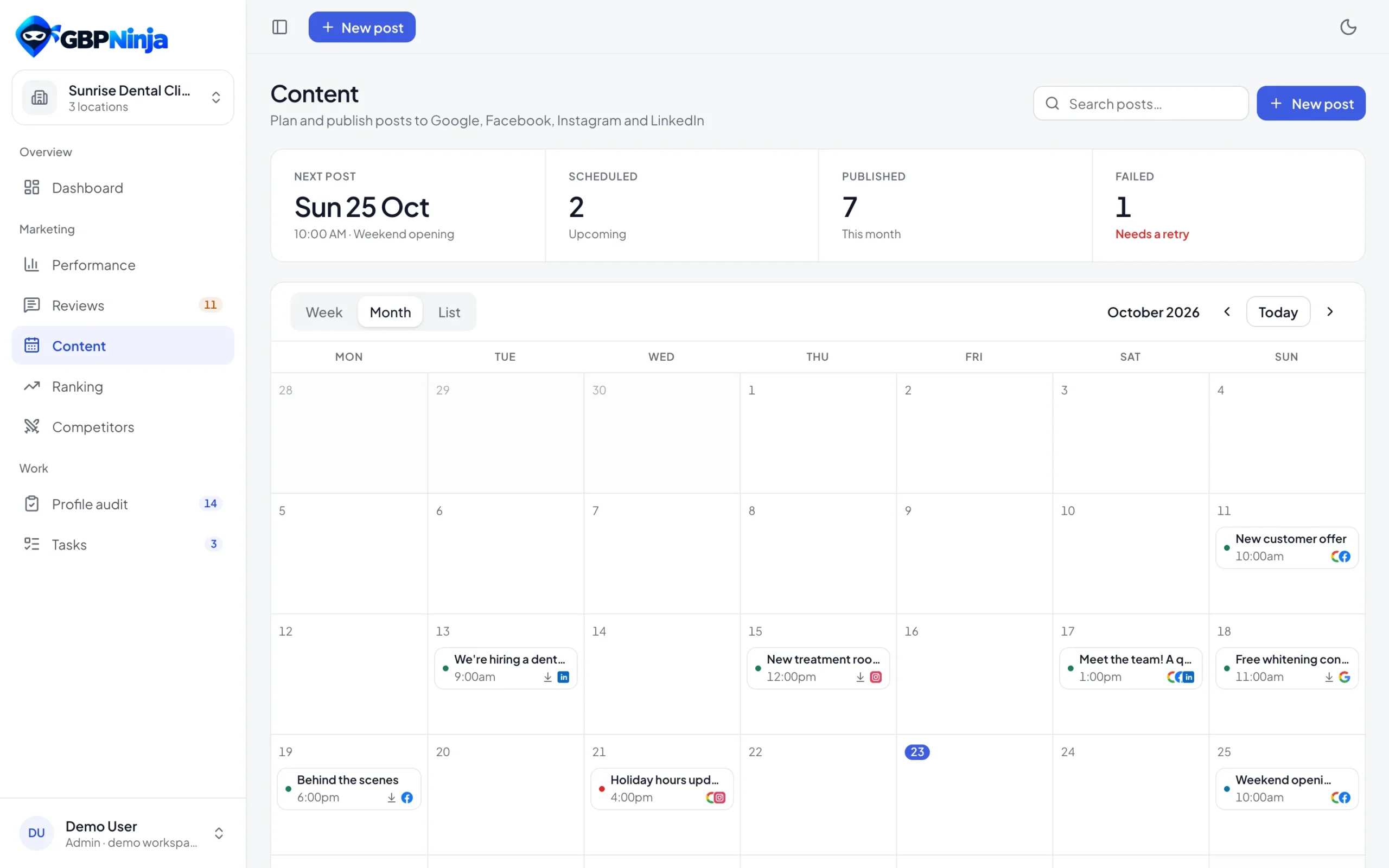
Google My Business scheduling made visual: see every scheduled, published and draft post by week, month or as a list. Drag a post to a new day to reschedule it, with undo if you change your mind. Posts made on Google show up too, so nothing is missing.
- Week, month and list views
- Drag and drop to reschedule
- A calendar for every location
- Posts published on Google imported automatically
One GMB post scheduler for Google, Facebook, Instagram and LinkedIn
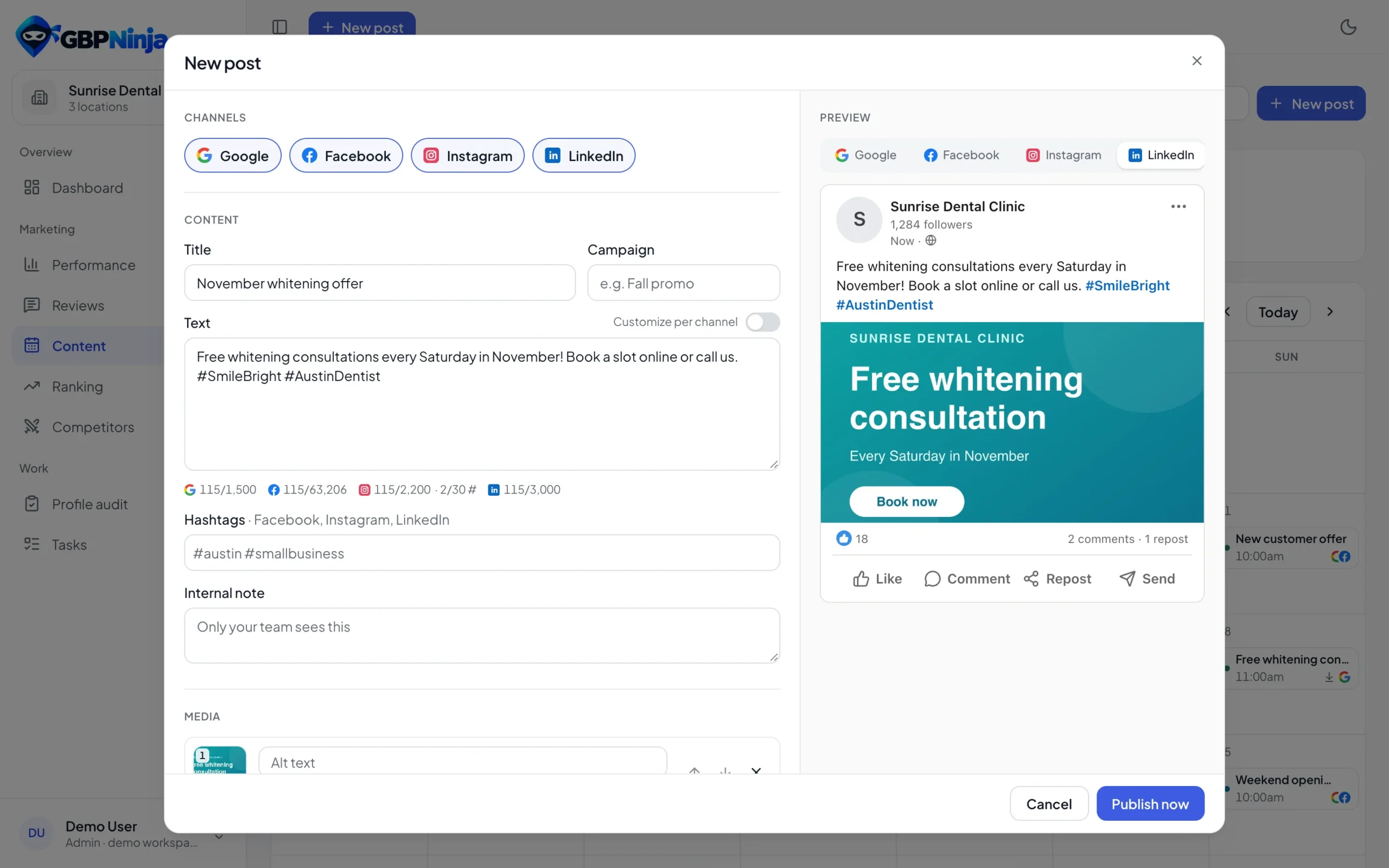
A Google My Business post scheduler that also covers your social pages. Write once and tick the networks. Each one gets a live preview and its own text if you need it, and media is checked against each network’s rules before you schedule, so posts don’t fail at the last minute.
- Live preview for every network
- Different text per channel when you want it
- Photos resized and checked for each network
- Instagram first comment for hashtags
Every Google post type, ready to schedule
Use the same post types you’d use on Google, plus a button that turns views into calls and bookings.
GMB posting for one location or hundreds
A GBP post scheduler built for businesses with many locations and the agencies that run them.
Many locations, one post
Pick the locations and the same post goes out to each one on time.
Your whole team
Invite teammates as admins or members, limited to their locations.
Delete everywhere
Delete a published post in the app and it comes down on Google, Facebook and LinkedIn too.
Clear failures
If a network rejects a post you see why, and can fix it and publish again.
Schedule Google My Business posts free
Most GMB schedulers start with a trial and then ask for a card. GBPNinja’s GMB posting software is free: scheduling, the content calendar, every post type and every connected network, for every location you manage.
If you’ve been looking for a free GMB post scheduler or a way to auto post to Google My Business for free, sign up, connect your profile and schedule your first post in a few minutes.
Whether you call it a GMB scheduler, a Google Business Profile scheduler or a Google My Business posts scheduling tool, it’s the same job: your posts go out on time, every week, without you logging in to Google.
GMB post scheduler questions
Something else? Email support@gbpninja.com or read the help center.
How do I schedule posts on Google My Business?
Google’s own editor publishes posts straight away. To schedule Google My Business posts, connect your profile to GBPNinja, write the post, pick a date and time and click Schedule. GBPNinja publishes it for you when the time comes.
Can you schedule posts on Google Business Profile without a tool?
No. Google Business Profile has no built-in scheduler, so you need a Google Business Profile post scheduler like GBPNinja that holds the post and publishes it at the time you pick.
Is GBPNinja a free GMB post scheduler?
Yes. GBPNinja is a free Google My Business posts scheduler: scheduling Google My Business posts is free, with no trial and no credit card. Every feature of the GMB posting software is included.
Which Google post types can I schedule?
What’s new updates, Offers (with coupon code, dates and terms) and Events (with start and end times), each with an optional photo and a button: Book, Order online, Buy, Learn more, Sign up or Call now.
Can I schedule one post for several locations?
Yes. Pick the locations when you write the post and it goes out to each of them at the scheduled time. Each location’s calendar shows the posts that target it.
Can I auto post to Facebook, Instagram and LinkedIn too?
Yes. Write once and tick the networks. Each gets a live preview and its own text if you want, and they all publish at the same scheduled time.
Can I change a scheduled post?
Yes. Open it to edit the text, photo or time, or drag it to another day on the calendar. You can also delete it before it goes out.
What happens if a post fails to publish?
The post is marked as failed with the reason Google or the network gave, and your dashboard shows it so you can fix it and publish again.
Plan this month's Google posts today
Free GMB posting software. No credit card, set up in minutes.